Configuring Tags for Alarms
A tag must be configured to trigger alarms by setting the alarm state trigger thresholds and by enabling alarming.
Note
Tag alarms are enabled by default.
To configure a tag for alarms:
- Open the details form for the tag that you want to configure. You can do this from either the Data Sources or the Site Tags module as follows:
- In the Data Sources module, locate the site and tag and click
 More Info to open the details form
 - In the Site Tags module, use the
 Find tool to locate and select the tag.
- In the Data Sources module, locate the site and tag and click
- Select the tag and open the Alarm tab.
- Click Edit and enter these alarm details:
All tag types
Field Description Enabled
Select this checkbox to enable alarm triggering.
Priority
Set the alarm priority. This property can be used when you are creating alarm actions for this alarm.
Logged
Specify whether alarm states are logged for this tag. We recommend that you set this flag. Alarm states can be logged even if you do not enable the tag to trigger an alarm
Analogue tag types
If the tag data is scaled, use the scaled value in these fields rather than the raw value.
Field Description High High
High-high alarm limit
High
High alarm limit
Low
Low alarm limit
Low Low
Low-low alarm limit
Deadband
Set the width of the deadband for analogue alarms. This is used to suppress alarms triggered by random noise. The deadband is applied both above and below the trigger value.
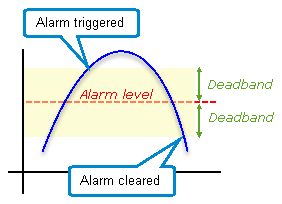
When a deadband is set, the alarm triggers above the deadband and clears below the deadband.
ROC Time (sec)
Time in seconds over which a rate of change is calculated. This is used in conjunction with the next two fields to calculate rates of falling and rising values.
An alarm is triggered if the rate of rise, or the rate of fall, exceeds the limits specified
ROC Rise
Amount of rise - used with the rate of change time to calculate the rate of rise
ROC Fall
Amount of fall - used with the rate of change time to calculate the rate of fall
Digital tag types
Field Description Normal
Specify whether the normal (non-alarmed) state for the tag is 0 or 1
- Click Save to save your changes.