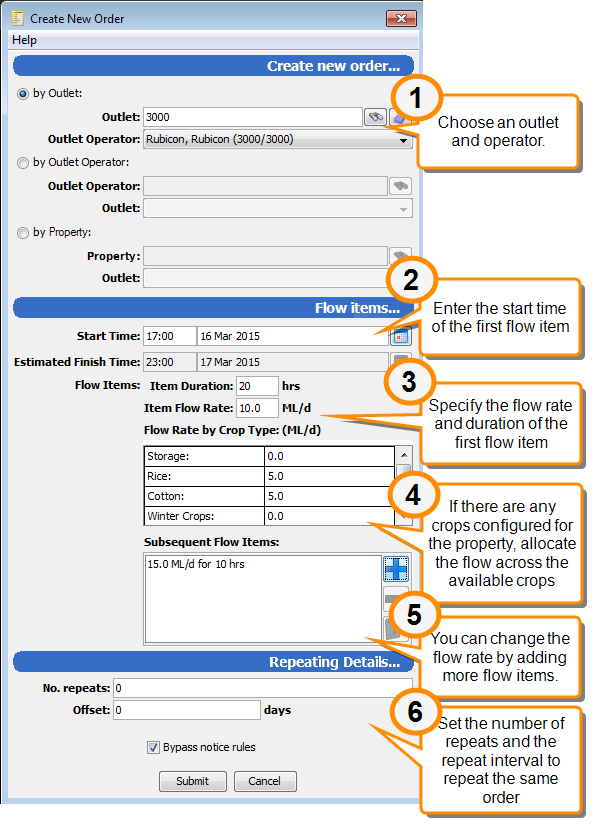
Ordering by Crop Type
If crop types have been defined for a property, the crop types for each order must be specified at ordering time.
Varying the flow rate for an order
If you want to vary the flow rate during the order, you can create several flow items to run in sequence. A flow item is defined by a flow duration and a flow rate. The first flow item sets the initial flow rate and you can change the flow rate by creating subsequent flow items.
Set the proportion of the flow allocated to each crop type for the first flow item. The flow rate is allocated in the same proportions in any subsequent flow items.
To create an order with crop types:
Note
If crop types are defined for a property, you cannot place an order for the property without specifying the crop types to be supplied.
If you cannot place an order for a property because no crop types are listed on the order form, check to ensure that at least one crop types is marked as Active and that its End Date has not passed.
- Click
 Orders to open the Orders module.
 - Click
 Create New Order to create a new order.
 - Enter the following details:
Field Description Specify the Outlet and the Outlet Operator. Choose one of the following options depending on whether you want to start with the outlet or with the outlet operator.
by Outlet
Search for or specify the Outlet for the order. The application will look up the Outlet Operator. If the outlet is shared, you will choose the outlet operator from a drop-down list.
by Outlet Operator
Search for or specify the Outlet Operator for the order. If the operator has more than one outlet, you will choose the Outlet from the drop-down list.
Start time/date
Start time of the first flow item. The Finish Time is calculated when you finish entering flow items and save the order.
Item Duration
Duration of the first flow item
Item Flow Rate
Flow rate of the first flow item
Flow Rate by Crop Type
Flow rate for each of the crop types listed. These must add up to the total Item Flow Rate
Subsequent Flow Items
This field is used if you want to vary the flow rate during the span of the order.
Click
 to add a new flow item and specify the duration and the flow rate.
The flow rate for subsequent items is distributed among the crop types in the same proportion as in the first flow
Bypass notice rules
Select this field to place an order that violates the order notice requirements.
Order notice requirements specify how much notice must be given before an order starts or is changed, but you can override these requirements with this checkbox.
- Click Submit to save your changes.