Tag Expression Example
This example steps through creating a tag expression to set the status of a hypothetical "flow monitor" tag to monitor the status of flow at a single gate site. The tag will determine whether there is any water flowing at a site by reading the flow rate at the site. Then we will modify the tag to base the status on both the flow rate and the recent flow history.
A status of 1 will indicate that water is flowing (or has been flowing recently), a status of zero will indicate no recent flow.
Planning the tag expression
Plan your tag expression first. It is useful to plan the sequence of statements before you enter the tag expression because you cannot change the sequence of expressions after they have been entered.
We will use the following logic:
If the current flow rate is zero, set the flow monitor tag to zero. If the current flow rate is not zero set the flow monitor tag to one.
We will need four statements:
| Seq No | Statement type |
|---|---|
| 1 | A conditional statement to test the flow rate. If the flow rate is zero, we will return the value in statement 3 (zero), otherwise we return the value in statement 4 (one). Whatever we return will be the value written to the flow monitor tag. |
| 2 | A value statement to return the flow rate |
| 3 | A value statement to return zero |
| 4 | A value statement to return one |
Writing the tag expression statements
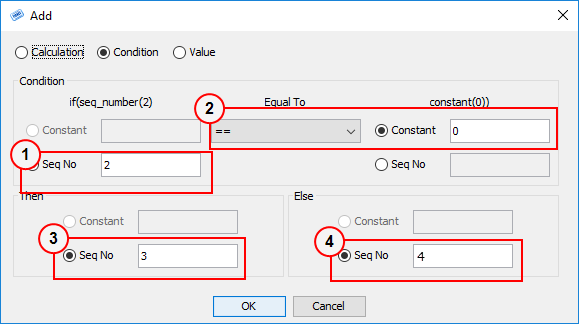
Statement 1
- Get the flow rate from statement 2
- Test to see if it is equal to zero
- If it is, return the value from statement 3
- Else, return the value from statement 4
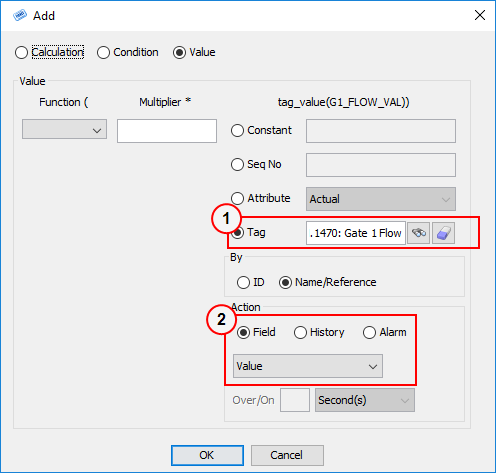
Statement 2
- Select the Gate 1 Flow tag. (Because it is at the same site we can select the tag by name).
- Return the current value of the tag.
key
caption
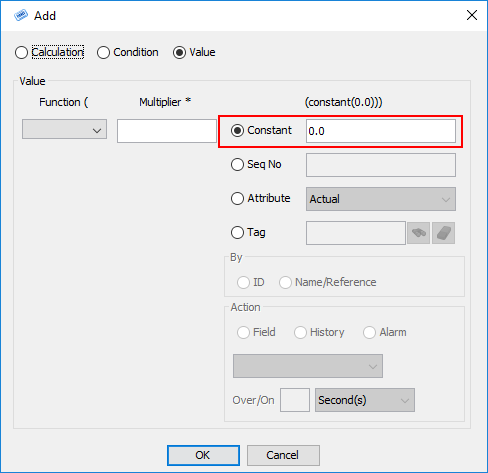
Statement 3
- Return a value of zero (note that we have to enter this as 0.0)
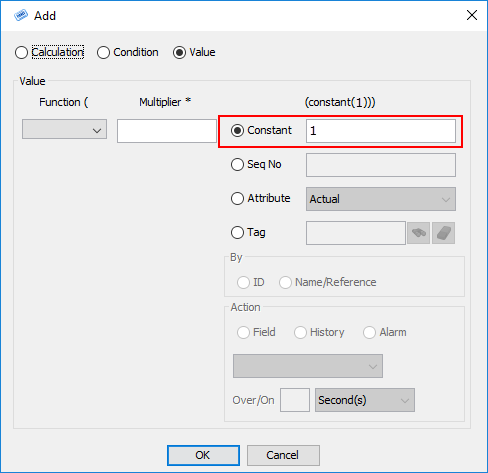
Statement 4
- Return a value of one
Modifying the tag expression
Now let's add an additional check. We will use the following logic:
If the current flow rate is zero, check the flow history for the last hour. If both the current flow and the historical flow are zero, set the flow monitor tag to zero. Otherwise, set the flow monitor tag to one.
We will need six statements altogether. New statements are highlighted in yellow
| Seq No | Statement type |
|---|---|
| 1 | A conditional statement to test the flow rate. If the flow rate returned from statement 2 is zero, we will return the value returned from statement 5 which checks the flow history, otherwise we will return the value in statement four (one). Whatever we return will be the value written to the flow monitor tag. |
| 2 | A value statement to return the flow rate |
| 3 | A value statement to return zero |
| 4 | A value statement to return one |
| 5 | A conditional statement to test the flow history. If the flow history (returned from statement 6) summed to zero, we will return the value in statement 3 (zero), otherwise we return the value in statement 4 (one). |
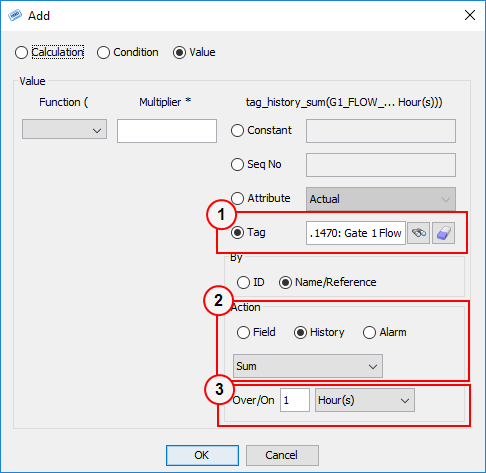
| 6 | A value statement to return the sum of the flow history over the past hour |
We've added the new statements at the end of the sequence because you cannot insert statements into the middle of a tag expression, so this reduces the amount of editing required for the existing statements. In practice it doesn't matter in what order you create the statements as long as the first conditional statement is statement number one.
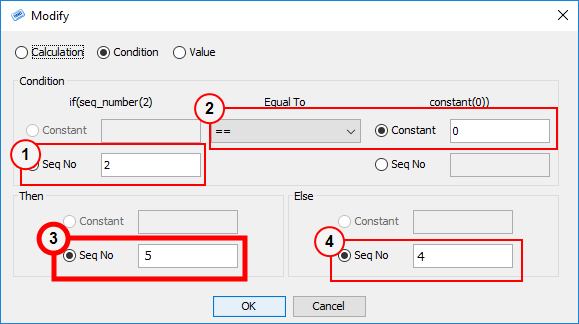
Statement 1
Modify this statement to change step three:
- Get the flow rate from statement 2
- Test to see if it is equal to zero
- If it is, return the value from statement 5 (our new conditional statement)
- Else, return the value from statement 4
Statement 5
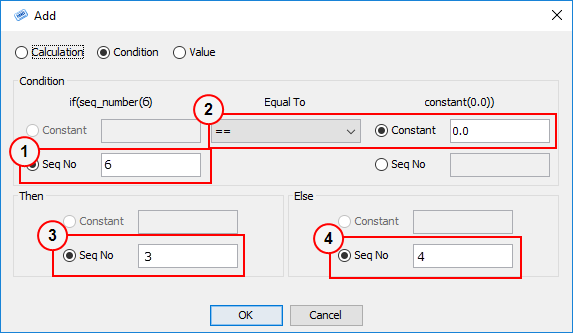
- Get the historical flow total from statement 6
- Test to see if it is equal to zero
- If it is, return the value from statement 3
- Else, return the value from statement 4
Statement 6
- Select the Gate 1 Flow tag.
- Return the sum of the historical values of the tag
- Over the last hour