Moving Network Objects
Moving an object changes its position without breaking its network connections. You can move single outlets and properties, or move an entire network segment by selecting a regulator and moving all the network components that are supplied by that regulator.
To move a property:
- Select the property that you want to move.
- Right-click and choose Move from the shortcut menu. The cursor will change to a crosshair.
- Click on the canvas to indicate where you want to move the object.
To move an outlet:
When you move an outlet you can move either the outlet itself, or the connection point between the outlet and the reach
- To move the outlet itself, click on the outlet icon so that the link between the outlet and the reach is selected.
Or
Click on the node where the outlet is connected to the reach. Only the connection node is selected.
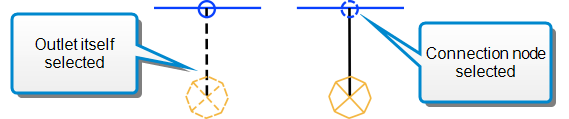
- Right-click and choose Move from the shortcut menu. The cursor will change to a crosshair.
- Click on the canvas to indicate where you want to move the outlet
Or
Click the point on the reach where you want to connect the outlet.