Finding over-capacity drops
You can quickly search for any over-capacity drops in the plan area and navigate to that location.
To search for over-capacity drops:
- Click
 Over-capacity Drops on the menu bar. The Over Capacity Drops dialog box opens.
 The plan day is displayed at the top of the dialog box and any over-capacity drops are listed below with the furthest downstream drop at the top of the list. All drops that are over capacity at any time during the plan period (including the offset periods) are displayed in the list, but drops that are not over capacity on the currently displayed search day are greyed out. Use the arrow buttons on either side of the search day field to navigate through the plan period.
- Click on a drop in the list to jump to that drop in the Planning Schematic.
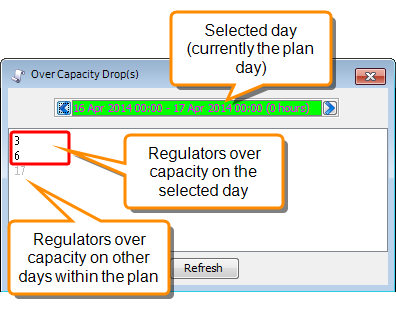
List of over-capacity drops for the current search day. drops that are over-capacity on other days are greyed out in the list. The drop at the top of the list is the furthest downstream.