Registering Parties with Comm Types
A party must be registered with a comm type to receive messages of that type. You can register parties directly in DMS, or customers can select the types of messages they want to receive if you are using an online customer portal for water orders.
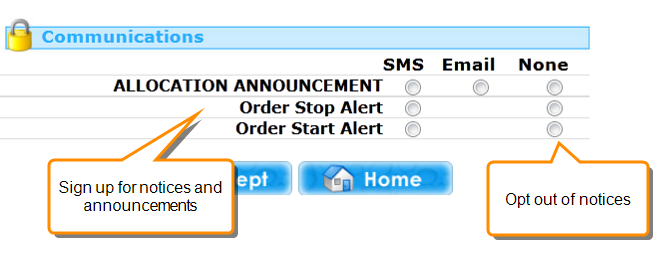
Within DMS you can add party registrations from either the Comm Types module or the Parties module. If you use the Parties module you will also be able to check or update the party's contact details.
If a party is registered for a comm type, a green tick will appear in one or more of the delivery method columns for that comm type on the party's registration record.
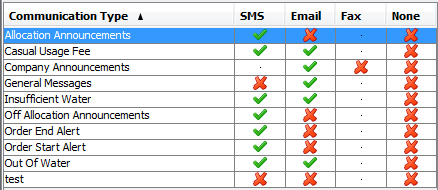
The 'None' Option
If the None option is selected for a customer, this shows that the customer has explicitly requested to not be sent messages of this type. No other delivery method can be selected while None is selected.
Registering Parties for Comm Types in DMS
To register a party for a comm type in DMS:
- Click
 Parties to open the Parties module.
 - Select the party who you want to register and open the Registration tab.
- Click Edit to make the tab editable.
- Check the Contact Details for the party. You must add contact details for a delivery method before you can select that method for a comm type.
Example
You must provide an email address for a party before the party can be registered to receive messages by email.
- Double-click the comm type that you want to edit.
- Select the checkboxes beside the delivery methods that you want to use for this comm type. If you do not select any, the party will not receive messages with this comm type.
- Click OK and then Save to save your changes.