Excluding a Component from a Group
You may need to exclude components from a group when you are adding a group or an area to a parent group, but you do not want to include ALL the members of the sub-group or area to the parent group. To do this, you must create an EXCLUDE COMPONENT relationship between the group and the object that you want to exclude.
Enabling Exclude Component
If you have not excluded components before, you may need to set up the EXCLUDE COMPONENT relation type between the group and the object type of the object you want to exclude.
See Associating RelationTypes with Object Types for more details.
For example, to allow you to exclude a Regulator object from a group you would do the following:
To enable excluding an object from a group:
- Click
 Object Types to open the Object Types module.
 - Select the object type that you want to exclude from. In this case, choose the Link > Group object type.
- On the Relations tab, click Insert to open the Inserting Relations screen.
- Fill in the relation details as follows:

Property Description Object Type
Set the Group as the Super Type
Relation Type
Choose the EXCLUDE COMPONENT relationship
Sub Type/Super Type
Set the Regulator as the sub-type - Click Save to save your changes.
You can now specify a Regulator object (or any of its sub-types) to exclude from a group. For example, to exclude Regulator 1001 from Planning Group DMS-TCC, do the following:
To exclude an object from a group:
- Click
 Groups to open the Groups module.
 - Select the group from which to remove the object. In this example, choose Planning Group DMS-TCC
- On the Relations tab, click Insert to open the Inserting Relations screen.
- Fill in the relation details as follows:
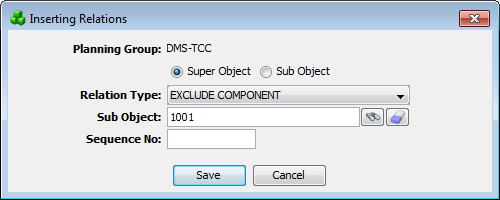
Property Description Object Type
Set the DMS-TCC Planning Group as the Super Object
Relation Type
Choose the EXCLUDE COMPONENT relationship
Sub Type/Super Type
Set Regulator 1001 as the Sub Object - Click Save to save your changes.
When the group is next generated, the regulator will be excluded from the planning group.
If you want to include the object again, remove the EXCLUDE COMPONENT relationship between the objects.