Setting Language and Time Zones for Web Applications
Rubicon web applications including SiteConnect. use a Tenant object to determine the language and locale of customers associated with that tenant. Parties can be associated with a specific tenant in the Parties module.
What is a Tenant?
A tenant is an object that is used to store the settings for a party.
Settings that are currently stored include:
-
Language
-
Timezone
By default, all of your customers will belong to the same tenant. However, if you have customers in different time zones, or in different language groups, you can create additional tenants to organise your customers.
Creating a Tenant
Create a new object of type Tenant in the Objects module. See Creating an Object for more details. The tenant object will be used for creating sets of users who share the same time zone and language settings so we recommend that you name the tenant accordingly.
Setting the time zone and langage for a tenant
Set the time zone and language by setting the appropriate attribute values on the Attributes tab:
-
The Default Locale Code attribute specifies the tenant language
-
The TimeZone attribute specifies the tenant time zone
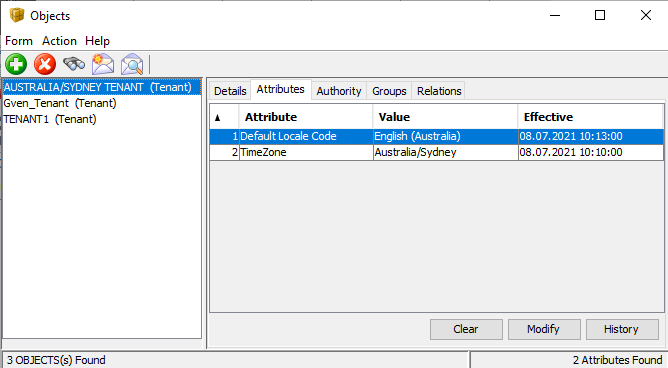
Tenant attributes
Add a Tenant to a Party
Add a tenant to a party to set the language and location options for that party.
To add a party to a tenant
-
In the Parties module, select the party to which you want to add a tenant.
-
On the Details tab, click Edit to edit the party details and enter the tenant details in the Tenant field.
-
Click Save to save your changes.

Adding a tenant to a party