Working with the Event Navigator
The Event Navigator is a useful tool for viewing the link status of flow events. Open the Event Navigator from the Planning Schematic main menu by choosing:
- Event > by Regulator to view flow events for orders downstream of a linking regulator. This is a useful option during the planning process when you will be planning on a pool by pool basis.
- Event > by Plan to view all flow events for the current plan. This is a useful option when you are reviewing the progress of the plan to see what remains to be planned.
Layout of the Event Navigator
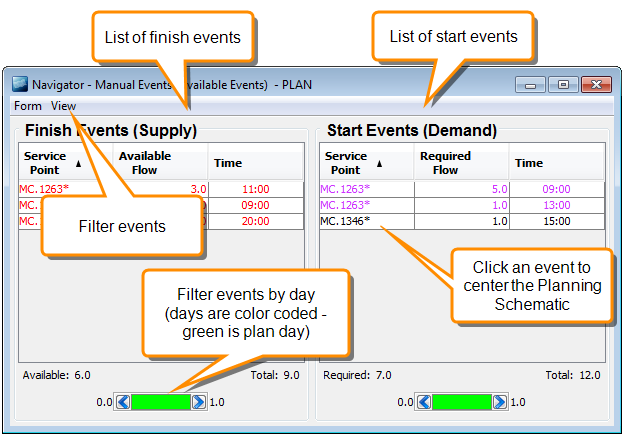
Event Statuses
The status of flow events is indicated using the following styles:
- Color - indicates whether or not the event has any links
- Asterisk - an asterisk indicates that the event starts and finishes on the same day.
| Example | Description |
|---|---|
| Finish event |
Finish event with no links. Event does not start and finish on the same day. |
| Finish event* |
Finish event with no links. Event starts and finishes on the same day. |
| Start event |
Start event with no links. Event does not start and finish on the same day. |
| Start event* |
Start event with no links. Event starts and finishes on the same day. |
|
Any event |
Start or finish event with some linked and some unlinked flow. Event does not start and finish on the same day. |
|
Any event* |
Start or finish event with some linked and some unlinked flow. Event starts and finishes on the same day. |
Filtering Events
Filter events to show different types of event. For example, show all unlinked events so you can complete sufficient links to finalise the plan. To apply a filter, click View on the Event Navigator menu and choose one of these options:
| Filter | Description |
|---|---|
|
Unlinked |
Show events that are not linked at all. This view excludes partially linked events because you do not have to fully link these to finalise the plan |
|
Available |
Show events that are unlinked or are partially linked (that is, there is still flow available for linking) |
|
Linked |
Show events that are fully or partially linked |
|
Autolinked |
Show events that were autolinked |