Shelving and Unshelving Alarms in the Alarm List
Viewing shelved alarms in the Alarm List
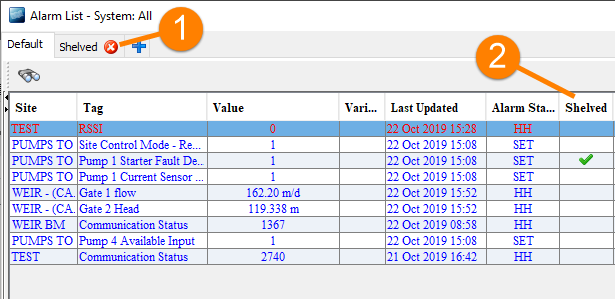
By default, shelved alarms are filtered out of the default tab on the Alarm List (but you can adjust the filters if you choose). When you display all alarms, shelved alarms are indicated by a tick in the Shelved column. The Alarm List also includes a tab that is filtered to show only shelved alarms
You can access the Alarm List by opening the Network Schematic (for example, from the Plan History Module), or from SCADAConnect Desktop.
-
Tab with "Shelved" filter
-
Shelved column
Alarm List showing shelved alarms
Shelving alarms for a tag
To shelve the alarms for a tag:
- Select the alarm that you want to shelve from the Alarm List
- Right-click and choose Alarm Shelving from the shortcut menu.
-
On the Alarm Shelving screen, click Edit.
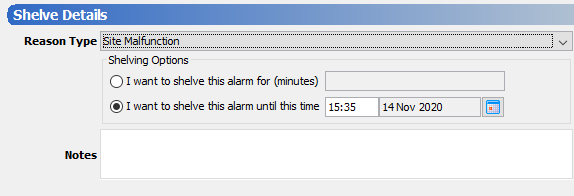
Alarm shelving details
Enter the following details:
Reason for shelving the alarm
Duration of the shelving period (or time when you want the period to end). This must be no longer than the configured maximum shelving period for the system.
(Optional) Any notes you want to make about the shelving period.
Changing or unshelving alarms
You can change the shelving period while the alarms are shelved.
To change or unshelve a shelved alarm:
-
Right-click on a shelved alarm and choose Alarm Shelving from the context menu.
-
On the Shelving Update screen, click the Edit button to change the shelving period
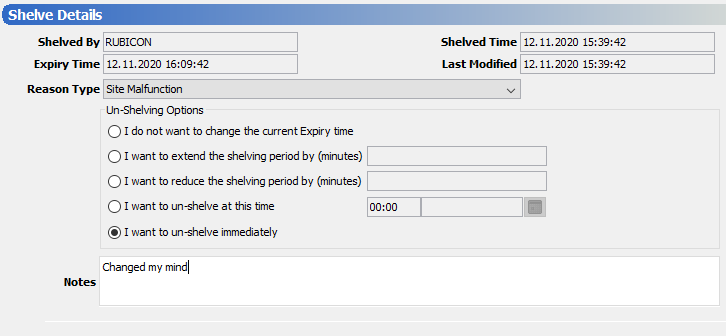
Alarm unshelving options
- You can now change the Reason Type, or change the shelving period by choosing one of the following options:
- Extend the shelving period by a specified number of minutes.
Note
Note that if you extend a shelving period, the maximum time limit is still calculated from the time when you first shelved the alarms. For example, if you set the period to the maximum allowed, you cannot later extend the period. If you need to extend the period, unshelve and reshelve the alarms.
Reduce the shelving period by a specified number of minutes. If you reduce the period by more minutes than remain the alarms are immediately unshelved.
Unshelve at a specific time.
Unshelve immediately.
- Extend the shelving period by a specified number of minutes.